> ## Documentation Index
> Fetch the complete documentation index at: https://docs.3dpreppro.com/llms.txt
> Use this file to discover all available pages before exploring further.
# 壁厚
> 设置可靠打印的最小壁厚
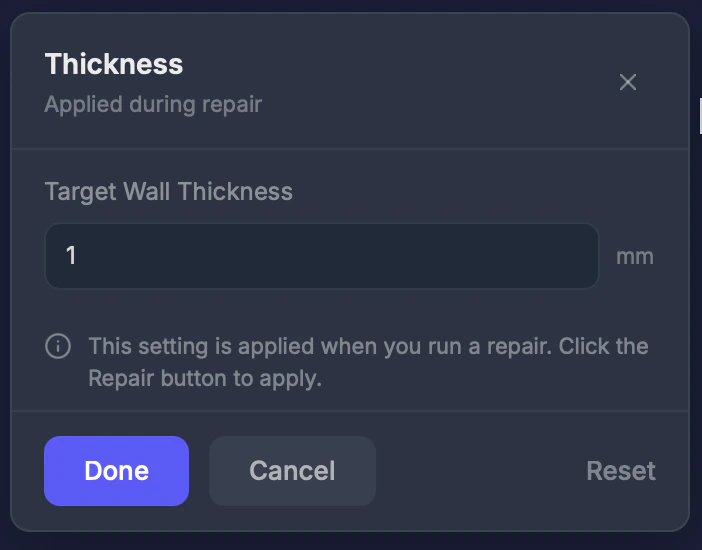 壁厚设置模型中任何壁面的最小厚度。修复过程中,薄于此值的壁面会自动加厚。
## 何时使用此工具
当您的模型有精细的特征、薄边缘或可能在打印或后处理过程中断裂的小细节时。
## 设置
### 厚度 (0–10 mm)
最小壁厚。**默认值:1.0 mm。**
**按打印机类型推荐的值:**
| 打印机 | 最小厚度 |
| - | - |
| FDM | 1.0–1.5 mm |
| SLA / 树脂 | 0.5–1.0 mm |
| 全彩(Mimaki) | 0.7–1.0 mm |
| SLS | 0.7–1.0 mm |
## 操作步骤
在工具栏中点击**壁厚**。
根据打印机要求调整数值。
此设置在下次修复时应用。
将厚度设置低于 **0.5 mm** 可能导致壁面在打印或后处理过程中碎裂或断裂。
This documentation is built and hosted on [Mintlify](https://mintlify.com), a developer documentation platform.
壁厚设置模型中任何壁面的最小厚度。修复过程中,薄于此值的壁面会自动加厚。
## 何时使用此工具
当您的模型有精细的特征、薄边缘或可能在打印或后处理过程中断裂的小细节时。
## 设置
### 厚度 (0–10 mm)
最小壁厚。**默认值:1.0 mm。**
**按打印机类型推荐的值:**
| 打印机 | 最小厚度 |
| - | - |
| FDM | 1.0–1.5 mm |
| SLA / 树脂 | 0.5–1.0 mm |
| 全彩(Mimaki) | 0.7–1.0 mm |
| SLS | 0.7–1.0 mm |
## 操作步骤
在工具栏中点击**壁厚**。
根据打印机要求调整数值。
此设置在下次修复时应用。
将厚度设置低于 **0.5 mm** 可能导致壁面在打印或后处理过程中碎裂或断裂。
This documentation is built and hosted on [Mintlify](https://mintlify.com), a developer documentation platform.