> ## Documentation Index
> Fetch the complete documentation index at: https://docs.3dpreppro.com/llms.txt
> Use this file to discover all available pages before exploring further.
# 移除小零件
> 清理浮动碎片和断开的片段
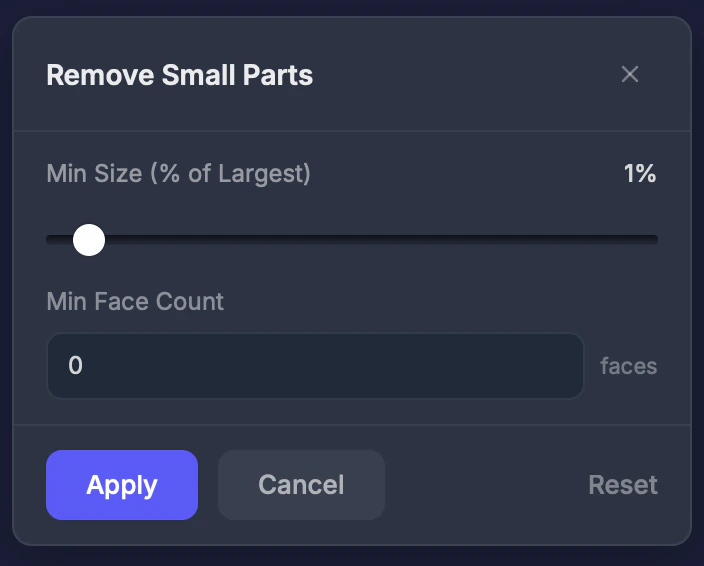 移除小零件过滤掉太小无法打印的断开部件。模型中经常包含由建模或导入错误产生的微小浮动片段。
## 何时使用此工具
* 模型有小的浮动碎片或散落的几何体
* 导入含有碎片的复杂场景后
* 当[错误](/editor/tools/errors)工具显示许多断开组件时
## 设置
### 最小尺寸
移除小于最大部件此百分比的零件。范围 **0.1–20%**。**默认值:1%。**
### 最小面数
移除面数少于此数量的零件。设为 **0** 禁用。
## 操作步骤
在交互工具部分点击此工具。
设置最小大小百分比。从1%开始,如需要则增大。
点击**应用**。小片段被移除。
## 提示
* 从 **1%** 开始逐渐增大——您不想意外移除重要部件
* 先使用[错误](/editor/tools/errors)工具查看有多少断开的零件
* 这不会移除与主模型物理连接的零件——只移除真正独立的浮动碎片
This documentation is built and hosted on [Mintlify](https://mintlify.com), a developer documentation platform.
移除小零件过滤掉太小无法打印的断开部件。模型中经常包含由建模或导入错误产生的微小浮动片段。
## 何时使用此工具
* 模型有小的浮动碎片或散落的几何体
* 导入含有碎片的复杂场景后
* 当[错误](/editor/tools/errors)工具显示许多断开组件时
## 设置
### 最小尺寸
移除小于最大部件此百分比的零件。范围 **0.1–20%**。**默认值:1%。**
### 最小面数
移除面数少于此数量的零件。设为 **0** 禁用。
## 操作步骤
在交互工具部分点击此工具。
设置最小大小百分比。从1%开始,如需要则增大。
点击**应用**。小片段被移除。
## 提示
* 从 **1%** 开始逐渐增大——您不想意外移除重要部件
* 先使用[错误](/editor/tools/errors)工具查看有多少断开的零件
* 这不会移除与主模型物理连接的零件——只移除真正独立的浮动碎片
This documentation is built and hosted on [Mintlify](https://mintlify.com), a developer documentation platform.