> ## Documentation Index
> Fetch the complete documentation index at: https://docs.3dpreppro.com/llms.txt
> Use this file to discover all available pages before exploring further.
# 360°视图
> 从每个角度查看模型,可自定义光照
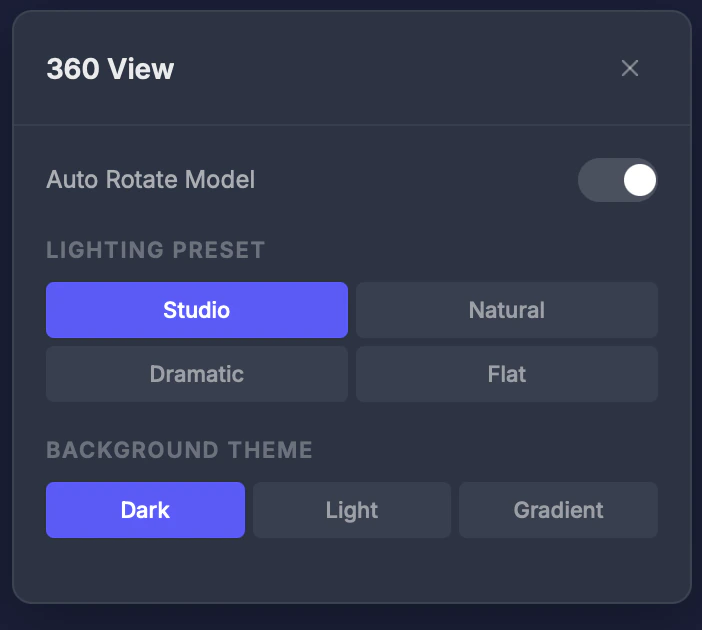 360°视图从多个角度显示模型的预渲染缩略图,让您自定义视口光照和背景以获得更好的可视化效果。
## 设置
### 光照预设
* **工作室** — 均衡的专业光照
* **自然** — 柔和的户外风格光照
* **戏剧性** — 高对比度,强阴影
* **平面** — 均匀光照,最准确地显示颜色
### 背景主题
* **深色** — 深色背景(默认)
* **浅色** — 白色/浅色背景
* **渐变** — 柔和渐变背景
### 自动旋转
开关,速度可调的自动旋转。无需手动移动鼠标即可全面查看模型。
## 提示
* 使用**戏剧性**光照突出表面细节和潜在打印问题
* 使用**平面**光照最准确地查看颜色——对全彩打印很有帮助
* 启用**自动旋转**快速全面查看整个模型
This documentation is built and hosted on [Mintlify](https://mintlify.com), a developer documentation platform.
360°视图从多个角度显示模型的预渲染缩略图,让您自定义视口光照和背景以获得更好的可视化效果。
## 设置
### 光照预设
* **工作室** — 均衡的专业光照
* **自然** — 柔和的户外风格光照
* **戏剧性** — 高对比度,强阴影
* **平面** — 均匀光照,最准确地显示颜色
### 背景主题
* **深色** — 深色背景(默认)
* **浅色** — 白色/浅色背景
* **渐变** — 柔和渐变背景
### 自动旋转
开关,速度可调的自动旋转。无需手动移动鼠标即可全面查看模型。
## 提示
* 使用**戏剧性**光照突出表面细节和潜在打印问题
* 使用**平面**光照最准确地查看颜色——对全彩打印很有帮助
* 启用**自动旋转**快速全面查看整个模型
This documentation is built and hosted on [Mintlify](https://mintlify.com), a developer documentation platform.