> ## Documentation Index
> Fetch the complete documentation index at: https://docs.3dpreppro.com/llms.txt
> Use this file to discover all available pages before exploring further.
# 工具栏布局
> 了解三个工具组
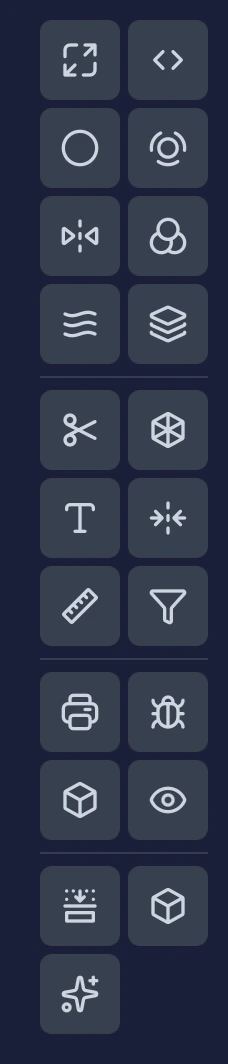 编辑器右侧的工具栏将18个工具分为三组,用分隔线隔开——8个管线工具、6个交互工具和4个检查工具。最后一条分隔线将底部一行快捷操作分隔开来:切片视图、详细信息和修复设置(仅在调整修复时显示)。
## 管线工具(上方)
这些设置影响**修复过程**。在运行修复之前进行调整。
| 工具 | 功能 |
| - | - |
| [缩放](/editor/tools/scale) | 调整模型大小 |
| [壁厚](/editor/tools/thickness) | 设置最小壁厚 |
| [挖空](/editor/tools/hollow) | 创建中空内部 |
| [关闭孔洞](/editor/tools/close-holes) | 填充缝隙和开口 |
| [裁剪透明](/editor/tools/cut-transparent) | 移除不可见表面 |
| [颜色](/editor/tools/colors) | 配置纹理处理 |
| [平滑](/editor/tools/smooth) | 修复期间的表面平滑 |
| [目标面数](/editor/tools/target-faces) | 控制多边形数量 |
## 交互工具(中间)
这些工具**直接修改您的模型**。在修复后使用它们进行额外更改。
| 工具 | 功能 |
| - | - |
| [切割](/editor/tools/cut) | 使用可选卡扣切割为多块 |
| [晶格](/editor/tools/lattice) | 生成填充结构 |
| [标签](/editor/tools/label) | 在表面添加文字 |
| [镜像](/editor/tools/mirror) | 创建镜像副本 |
| [测量](/editor/tools/measure) | 测量距离 |
| [移除小零件](/editor/tools/remove-small-parts) | 清理浮动碎片 |
## 检查工具(下方)
这些工具帮助您**分析和可视化**模型,不会改变它。
| 工具 | 功能 |
| - | - |
| [验证](/editor/tools/validate) | 可打印性分析 |
| [错误](/editor/tools/errors) | 网格质量报告 |
| [对象信息](/editor/tools/object-info) | 尺寸和统计信息 |
| [360°视图](/editor/tools/360-view) | 灯光和查看选项 |
## 底部一行
由最后一条分隔线隔开,这些是快捷操作,而非工具组。
| 操作 | 功能 |
| - | - |
| [切片视图](/editor/tools/slice-view) | 横截面可视化 |
| 详细信息 | 模型尺寸和修复详情 |
| 修复设置 | 查看当前修复所使用的设置——仅在调整修复时显示 |
## 视觉指示
* **蓝色高亮** — 当前活动工具
* **蓝色圆点** — 设置已从默认值自定义的工具
* **灰色** — 仅晶格会变灰,且仅当加载的模型是另一个工具的输出(切割、镜像或标签的结果)时。晶格可应用于原始模型或已修复的模型;其他所有工具都可用于任何模型,无论是否已修复。
This documentation is built and hosted on [Mintlify](https://mintlify.com), a developer documentation platform.
编辑器右侧的工具栏将18个工具分为三组,用分隔线隔开——8个管线工具、6个交互工具和4个检查工具。最后一条分隔线将底部一行快捷操作分隔开来:切片视图、详细信息和修复设置(仅在调整修复时显示)。
## 管线工具(上方)
这些设置影响**修复过程**。在运行修复之前进行调整。
| 工具 | 功能 |
| - | - |
| [缩放](/editor/tools/scale) | 调整模型大小 |
| [壁厚](/editor/tools/thickness) | 设置最小壁厚 |
| [挖空](/editor/tools/hollow) | 创建中空内部 |
| [关闭孔洞](/editor/tools/close-holes) | 填充缝隙和开口 |
| [裁剪透明](/editor/tools/cut-transparent) | 移除不可见表面 |
| [颜色](/editor/tools/colors) | 配置纹理处理 |
| [平滑](/editor/tools/smooth) | 修复期间的表面平滑 |
| [目标面数](/editor/tools/target-faces) | 控制多边形数量 |
## 交互工具(中间)
这些工具**直接修改您的模型**。在修复后使用它们进行额外更改。
| 工具 | 功能 |
| - | - |
| [切割](/editor/tools/cut) | 使用可选卡扣切割为多块 |
| [晶格](/editor/tools/lattice) | 生成填充结构 |
| [标签](/editor/tools/label) | 在表面添加文字 |
| [镜像](/editor/tools/mirror) | 创建镜像副本 |
| [测量](/editor/tools/measure) | 测量距离 |
| [移除小零件](/editor/tools/remove-small-parts) | 清理浮动碎片 |
## 检查工具(下方)
这些工具帮助您**分析和可视化**模型,不会改变它。
| 工具 | 功能 |
| - | - |
| [验证](/editor/tools/validate) | 可打印性分析 |
| [错误](/editor/tools/errors) | 网格质量报告 |
| [对象信息](/editor/tools/object-info) | 尺寸和统计信息 |
| [360°视图](/editor/tools/360-view) | 灯光和查看选项 |
## 底部一行
由最后一条分隔线隔开,这些是快捷操作,而非工具组。
| 操作 | 功能 |
| - | - |
| [切片视图](/editor/tools/slice-view) | 横截面可视化 |
| 详细信息 | 模型尺寸和修复详情 |
| 修复设置 | 查看当前修复所使用的设置——仅在调整修复时显示 |
## 视觉指示
* **蓝色高亮** — 当前活动工具
* **蓝色圆点** — 设置已从默认值自定义的工具
* **灰色** — 仅晶格会变灰,且仅当加载的模型是另一个工具的输出(切割、镜像或标签的结果)时。晶格可应用于原始模型或已修复的模型;其他所有工具都可用于任何模型,无论是否已修复。
This documentation is built and hosted on [Mintlify](https://mintlify.com), a developer documentation platform.