> ## Documentation Index
> Fetch the complete documentation index at: https://docs.3dpreppro.com/llms.txt
> Use this file to discover all available pages before exploring further.
# Printability Validation
> Check if your model is ready to print
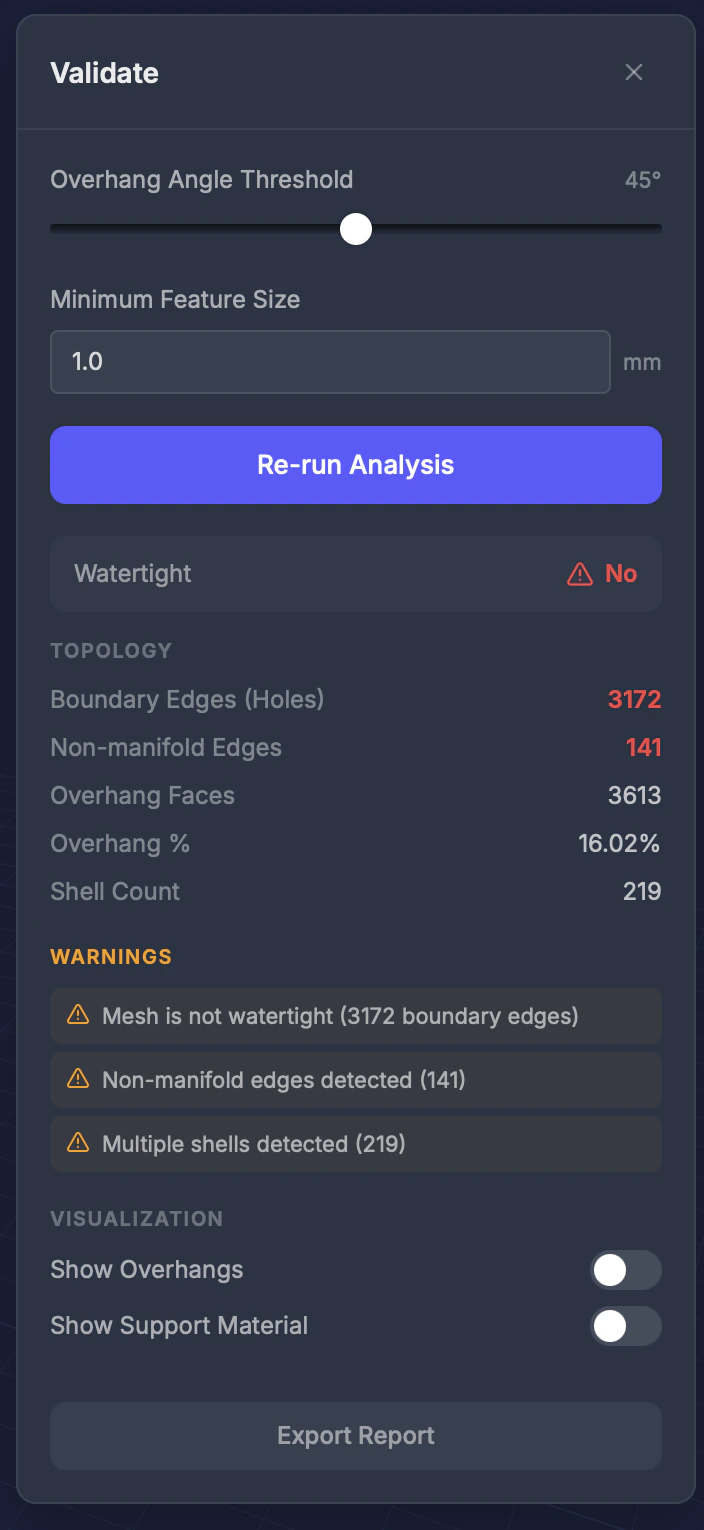 Validate runs a printability analysis on your model, checking for overhangs, thin features, and geometry issues specific to your printer type.
## When to use this
Before sending your model to the printer — run validation to catch potential problems and save time and material.
## Settings
### Minimum feature size
The smallest wall or feature (in millimeters) to flag as too thin. Enter a numeric value in mm (default **1.0**).
### Overhang threshold
The maximum overhang angle (in degrees) before an area is flagged. Default varies by printer type.
## Results
After running validation, you see:
* **Watertight status** — Whether the mesh is fully closed (**Yes** or **No**)
* **Overhang areas** — Highlighted in red directly on the model
* **Topology stats** — Boundary Edges (Holes), Non-manifold Edges, Overhang Faces, Overhang %, and Shell Count
* **Issue list** — Each issue with severity and recommendations
## Tips
* Different printers have different needs — SLA can handle thinner walls than FDM
* **Overhang highlighting** helps you decide where support structures are needed
* Run validation after every repair to confirm the result is print-ready
Validate runs a printability analysis on your model, checking for overhangs, thin features, and geometry issues specific to your printer type.
## When to use this
Before sending your model to the printer — run validation to catch potential problems and save time and material.
## Settings
### Minimum feature size
The smallest wall or feature (in millimeters) to flag as too thin. Enter a numeric value in mm (default **1.0**).
### Overhang threshold
The maximum overhang angle (in degrees) before an area is flagged. Default varies by printer type.
## Results
After running validation, you see:
* **Watertight status** — Whether the mesh is fully closed (**Yes** or **No**)
* **Overhang areas** — Highlighted in red directly on the model
* **Topology stats** — Boundary Edges (Holes), Non-manifold Edges, Overhang Faces, Overhang %, and Shell Count
* **Issue list** — Each issue with severity and recommendations
## Tips
* Different printers have different needs — SLA can handle thinner walls than FDM
* **Overhang highlighting** helps you decide where support structures are needed
* Run validation after every repair to confirm the result is print-ready