> ## Documentation Index
> Fetch the complete documentation index at: https://docs.3dpreppro.com/llms.txt
> Use this file to discover all available pages before exploring further.
# Object Information
> View dimensions, polygon count, and volume at a glance
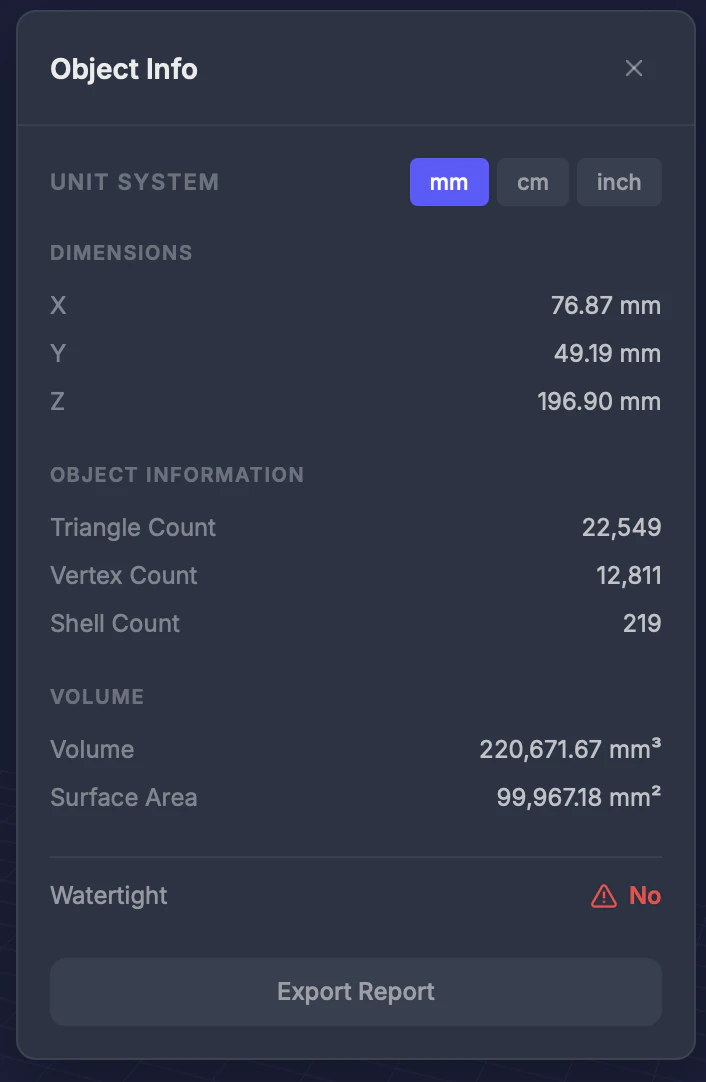 Object Info displays key measurements and statistics about your model at a glance.
## Information displayed
| Metric | Description |
| ----------------- | -------------------------------------------------------- |
| **Dimensions** | Width (X), height (Y), and depth (Z) in your chosen unit |
| **Polygon count** | Total number of triangular faces |
| **Vertex count** | Total number of corner points |
| **Volume** | Calculated volume in cm³ |
| **Surface area** | Total outer surface area |
| **Shell count** | Number of separate disconnected parts |
## Unit switching
Toggle between **millimeters (mm)**, **centimeters (cm)**, and **inches** to see dimensions in your preferred unit.
## Tips
* **Volume** is useful for estimating material cost — many printing services charge by volume
* A **high shell count** may indicate floating parts — use [Remove Small Parts](/editor/tools/remove-small-parts) to clean up
* Compare polygon count before and after repair to see how much the geometry was optimized
* For distance between specific features, use the [Measure](/editor/tools/measure) tool instead
Object Info displays key measurements and statistics about your model at a glance.
## Information displayed
| Metric | Description |
| ----------------- | -------------------------------------------------------- |
| **Dimensions** | Width (X), height (Y), and depth (Z) in your chosen unit |
| **Polygon count** | Total number of triangular faces |
| **Vertex count** | Total number of corner points |
| **Volume** | Calculated volume in cm³ |
| **Surface area** | Total outer surface area |
| **Shell count** | Number of separate disconnected parts |
## Unit switching
Toggle between **millimeters (mm)**, **centimeters (cm)**, and **inches** to see dimensions in your preferred unit.
## Tips
* **Volume** is useful for estimating material cost — many printing services charge by volume
* A **high shell count** may indicate floating parts — use [Remove Small Parts](/editor/tools/remove-small-parts) to clean up
* Compare polygon count before and after repair to see how much the geometry was optimized
* For distance between specific features, use the [Measure](/editor/tools/measure) tool instead