> ## Documentation Index
> Fetch the complete documentation index at: https://docs.3dpreppro.com/llms.txt
> Use this file to discover all available pages before exploring further.
# Error Detection
> Find and inspect mesh quality issues
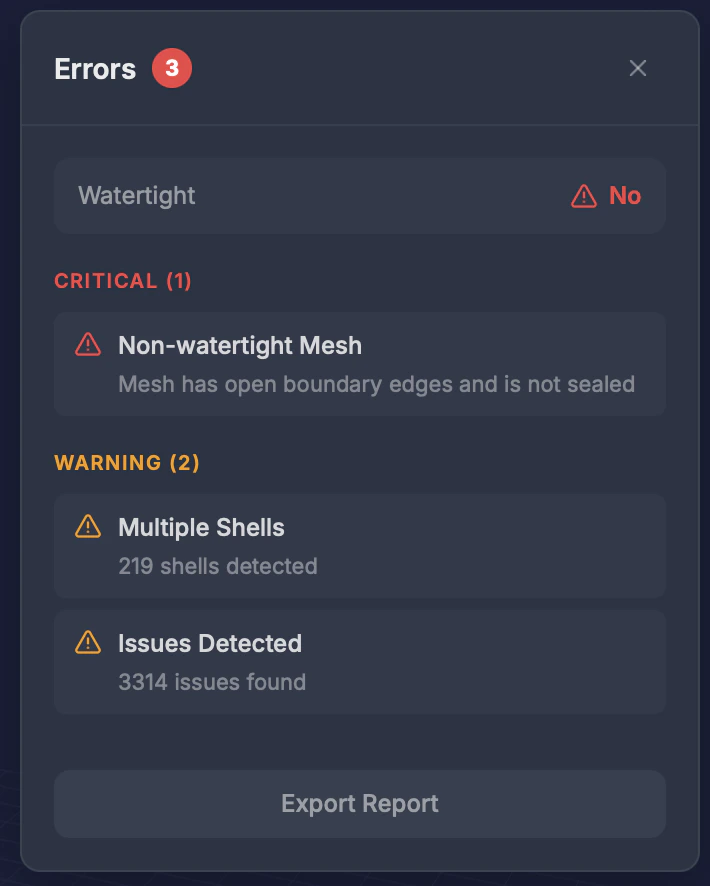 Error Detection scans your model for geometry problems that could cause printing failures or visual artifacts.
## When to use this
* Before repair, to understand what's wrong with your model
* After repair, to verify all issues were resolved
* When your model looks wrong or has unexpected gaps
## What it detects
The panel opens with a **Watertight** status (Yes/No), then lists any issues grouped by severity.
Before repair, issues are derived from your model's analysis:
| Issue | What it means |
| ----------------------- | ------------------------------------------------------------------------------ |
| **Non-watertight Mesh** | The mesh has open boundary edges and isn't sealed |
| **Multiple Shells** | The model contains more than one separate shell — shows how many were detected |
| **Issues Detected** | Other geometry problems found during analysis — shows a count |
After repair, the panel instead lists the issues returned by the repair.
## Results
* **Total issue count** shown as a badge next to the panel title
* **Grouped by severity** — issues are listed under Critical, Warning, and Info headings, each with a count
* **Fixed / Not fixed status** — after a repair, each issue shows whether it was resolved
## Tips
* **Non-manifold edges** are the most common issue — they mean surfaces don't form a proper solid
* Run this **before repair** to understand the scope of issues
* After repair, the error count should be **zero or near-zero**
* If errors persist after repair, try a different [model type preset](/repair/model-types)
Error Detection scans your model for geometry problems that could cause printing failures or visual artifacts.
## When to use this
* Before repair, to understand what's wrong with your model
* After repair, to verify all issues were resolved
* When your model looks wrong or has unexpected gaps
## What it detects
The panel opens with a **Watertight** status (Yes/No), then lists any issues grouped by severity.
Before repair, issues are derived from your model's analysis:
| Issue | What it means |
| ----------------------- | ------------------------------------------------------------------------------ |
| **Non-watertight Mesh** | The mesh has open boundary edges and isn't sealed |
| **Multiple Shells** | The model contains more than one separate shell — shows how many were detected |
| **Issues Detected** | Other geometry problems found during analysis — shows a count |
After repair, the panel instead lists the issues returned by the repair.
## Results
* **Total issue count** shown as a badge next to the panel title
* **Grouped by severity** — issues are listed under Critical, Warning, and Info headings, each with a count
* **Fixed / Not fixed status** — after a repair, each issue shows whether it was resolved
## Tips
* **Non-manifold edges** are the most common issue — they mean surfaces don't form a proper solid
* Run this **before repair** to understand the scope of issues
* After repair, the error count should be **zero or near-zero**
* If errors persist after repair, try a different [model type preset](/repair/model-types)