> ## Documentation Index
> Fetch the complete documentation index at: https://docs.3dpreppro.com/llms.txt
> Use this file to discover all available pages before exploring further.
# 360° View
> View your model from every angle with customizable lighting
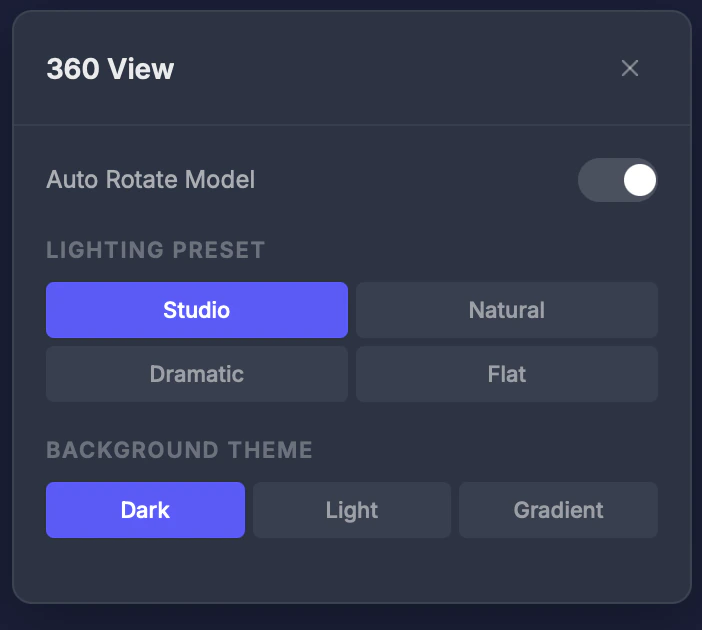 360° View shows your model's pre-rendered thumbnails from multiple angles and lets you customize viewport lighting and background for better visualization.
## Settings
### Lighting preset
* **Studio** — Balanced, professional lighting
* **Natural** — Soft, outdoor-style lighting
* **Dramatic** — High contrast with strong shadows
* **Flat** — Even lighting, shows colors most accurately
### Background theme
* **Dark** — Dark background (default)
* **Light** — White/light background
* **Gradient** — Soft gradient backdrop
### Auto-rotate
Toggle automatic rotation with adjustable speed. Great for getting a full view of your model without manual mouse movement.
## Tips
* Use **Dramatic** lighting to highlight surface details and potential printing issues
* Use **Flat** lighting to see colors most accurately — helpful for full-color prints
* Enable **auto-rotate** for a quick overview of the entire model
360° View shows your model's pre-rendered thumbnails from multiple angles and lets you customize viewport lighting and background for better visualization.
## Settings
### Lighting preset
* **Studio** — Balanced, professional lighting
* **Natural** — Soft, outdoor-style lighting
* **Dramatic** — High contrast with strong shadows
* **Flat** — Even lighting, shows colors most accurately
### Background theme
* **Dark** — Dark background (default)
* **Light** — White/light background
* **Gradient** — Soft gradient backdrop
### Auto-rotate
Toggle automatic rotation with adjustable speed. Great for getting a full view of your model without manual mouse movement.
## Tips
* Use **Dramatic** lighting to highlight surface details and potential printing issues
* Use **Flat** lighting to see colors most accurately — helpful for full-color prints
* Enable **auto-rotate** for a quick overview of the entire model